
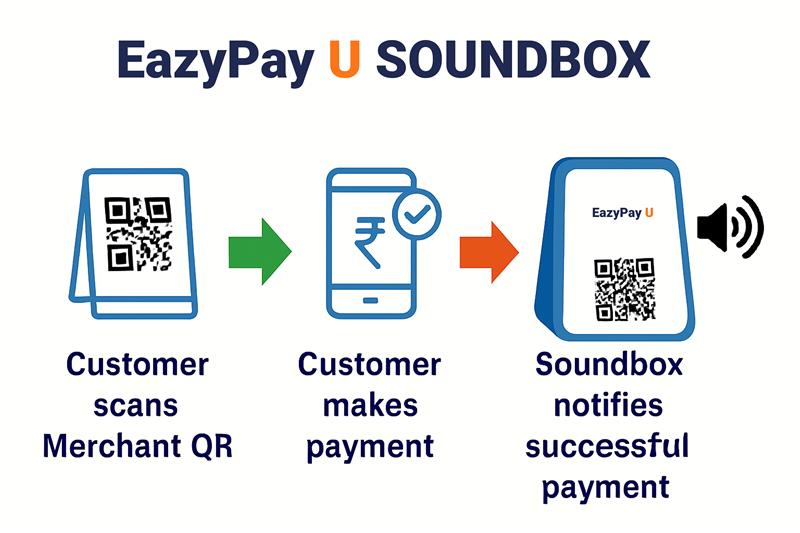
In the modern digital payments ecosystem, merchants no longer just require a system that processes transactions they demand a holistic, intuitive, and real-time interface that aligns with their operational flow. The Payment Soundbox, an IoT-enabled payment notification device, has rapidly become a game-changer for merchants who rely on quick, audible confirmations of customer payments. However, beneath the visible hardware and payment processing layers lies a critical component that determines how merchants perceive and interact with the device: the Merchant UX Layer. This layer is not merely an interface it is the culmination of thoughtful design, human cantered engineering, and seamless integration between technology and user expectations.
The Merchant UX Layer in a Payment Soundbox directly influences merchant satisfaction, operational efficiency, and adoption rates. When engineered correctly, it transforms the Soundbox from a basic payment notifier into an intelligent business assistant capable of delivering payment confirmations, transaction summaries, settlement insights, and actionable business alerts. In this article, we explore the Merchant UX Layer in depth, from its architecture and design philosophy to its impact on merchant operations, industry trends, and future innovations.
Understanding the Merchant UX Layer
The Merchant UX Layer refers to the combination of the device’s interactive design, audio/visual cues and connected interfaces (mobile apps, dashboards, voice prompts) that merchants directly experience during their day-to-day operations. It encompasses every touchpoint a merchant interacts with, from hearing a payment confirmation voice alert to checking settlement details in an associated app.
A Payment Soundbox without a merchant-focused UX layer is simply a hardware box that plays sounds. With a strong UX layer, it becomes a real-time assistant that aligns with merchant needs, addresses pain points, and offers confidence that payments are received securely and instantly.
Key Components of the Merchant UX Layer
- Voice Feedback System – Instant spoken confirmation of successful payments, customized for language and tone preferences.
- Visual Indicators – LED status lights that display transaction states, device connectivity, or battery levels.
- Merchant Companion App – Mobile or web application offering transaction logs, settlement tracking, and device controls.
- Multi-Language & Accessibility Features – Inclusivity through support for regional languages, gender-specific voices, and accessibility options.
- Configurable User Settings – Merchants can choose preferred volume levels, notification tones, or even custom voice messages.
The Role of UX in Merchant Trust and Confidence
One of the primary goals of the Merchant UX Layer is to foster trust. In markets where UPI, QR, and digital payments dominate, merchants often face issues like delayed confirmations, network outages, or fraudulent disputes. A well-designed UX layer mitigates these risks by:
- Providing Real-Time Payment Confirmation – Reducing the chance of disputes by ensuring the merchant hears and sees a confirmation instantly.
- Offering Redundancy in Alerts – Combining audio cues, visual indicators, and app notifications ensures confirmations are never missed.
- Maintaining Consistency – Merchants expect the same alert behaviour every time, which reduces cognitive load and boosts operational speed.
- Enhancing Transaction Transparency – Displaying transaction details in the companion app reassures merchants of payment authenticity.
The UX layer becomes the trust bridge between the unseen payment processing back-end and the merchant’s visible experience.
Merchant Journey in Payment Soundbox UX
A merchant’s interaction with the Payment Soundbox can be mapped across multiple stages of their journey:
1. Onboarding & Setup
- Unboxing the device, powering it on, and connecting to a network (via SIM or Wi-Fi).
- Guided setup via the companion app or voice prompts.
- Linking the device with a merchant’s payment account or QR code.
2. Active Usage
- Receiving payment confirmation alerts during busy transaction hours.
- Adjusting notification settings without interrupting business flow.
- Using multilingual support for better accessibility.
3. Troubleshooting & Support
- Understanding voice prompts or LED alerts when the device faces connectivity or battery issues.
- Accessing help directly via the companion app or hotline.
4. End-of-Day Operations
- Reviewing transaction summaries.
- Confirming settlement reports.
- Using device analytics for business insights.
A smooth merchant journey reduces friction, increases adoption rates, and improves the merchant’s perception of the payment provider.
Technical Architecture of the Merchant UX Layer
The Merchant UX Layer is supported by multiple underlying systems:
- Payment Processing Layer – Receives and validates payment information from UPI or QR code systems.
- Notification Engine – Triggers the audio/visual confirmation based on successful payment messages.
- IoT Connectivity Layer – Handles GPRS, 4G or Wi-Fi communication between the Soundbox and the backend.
- Merchant Interface Layer – The core UX layer, including the audio feedback system, LED notifications, and merchant-facing mobile app integration.
- Device Management Layer – Enables OTA updates, firmware upgrades, and remote configuration, ensuring the UX layer remains optimized.
This layered approach ensures the merchant interacts only with the essential, intuitive elements while the complex back-end processes remain invisible yet reliable.
Human Centered UX Design Principles for Payment Soundbox
Creating a merchant friendly UX involves understanding real-world constraints, such as noisy market environments, language diversity and limited device handling time.
Core Design Principles:
- Clarity over Complexity – Messages should be short, clear, and easily understood.
- Speed of Response – The gap between payment confirmation and notification must be minimal.
- Personalization – Allow merchants to set preferred voices, notification tones, and languages.
- Resilience in Low Connectivity – Offline confirmation messages for transactions queued during outages.
- Error Transparency – Clearly communicate errors like “Low Battery” or “No Network” without technical jargon.
Integration with Merchant Mobile Applications
While the Soundbox provides instant confirmations, the Merchant UX Layer extends into mobile apps where deeper insights are available:
- Transaction History Search – Merchants can view specific payments for dispute resolution.
- Settlement Tracking – Real-time updates on fund transfers to the merchant’s bank account.
- Device Management – Remotely adjust volume, change voice prompts or reboot the device.
- Push Notifications – Alerts for high value payments or unusual transaction patterns.
Accessibility and Multi-Language Support
India’s payment ecosystem thrives in diversity. The UX layer must accommodate:
- Regional Language Audio Alerts – Hindi, Tamil, Bengali, Marathi and more.
- Voice Selection – Male or female voices based on merchant preference.
- Special Accessibility Modes – High volume alerts for hearing-impaired users or longer alert tones for crowded environments.
UX and Merchant Engagement
The Soundbox can be used beyond payment confirmations to engage merchants:
- Promotional Messages – Announce offers or loyalty programs during idle device periods.
- Business Insights – Share daily sales summaries via audio prompts or app notifications.
- Cross-Selling Opportunities – Inform merchants about value-added services like loans or insurance.
Challenges in Designing Merchant UX for Soundbox
Some challenges include:
- Balancing simplicity with advanced features.
- Avoiding information overload.
- Ensuring battery efficiency while running continuous UX features.
- Managing diverse merchant expectations across regions and sectors.